
How To Check And Replace The Valves
You can read the steps below to see how you can check the pressure sensor connection. If you want to print this guide to keep beside you while performing the actions, you can download this file.
How To Check And Replace The Valves
When Should I Check The Valves?
When the pressure inside the chamber falls a lot below 300mbar time after time.
How To Check The Valves?
Step 1
Open the machine
Step 2
The non-return- or Mac valves are located on the left- and right side below the gas springs.
Step 3
When the machine gives the error 203, the valve might be leak. In that case you should replace the valve.
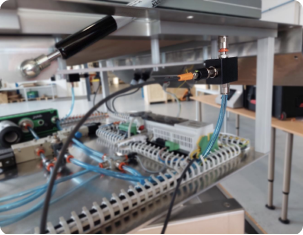
Replace With The Mac-Valve
Step 1
Mail Oxipack service if you need to order a new Mac valve
Step 2
Open the machine
Step 3
The non-return- or Mac valves are located on the left- and right side below the gas springs.
Step 4
Disconnect the air tubes and electrical connection
Step 5
Place the new Mac valve and connect the tubes and electrical connection
Step 5
Perform three empty tests to ensure it fixed the problem